
This is a multiday event from Aug 27, 2026 - Aug 29, 2026.
| When |
9:00 am - 5:00 pm
Aug 27, 2026
- Aug 29, 2026
|
|---|
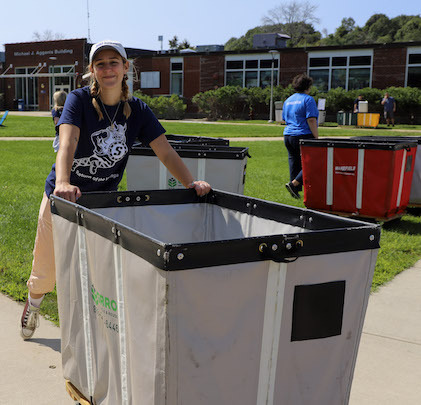
Save the dates for move-in weekend 2026!
- August 27 – First Year Day of Service / Move In Crew Move In*
- August 28 – Day 1 Move In - Marsh Hall, Peabody Hall, Bowditch Hall
- August 29 – Day 2 Move In – Atlantic Hall, Forten Hall
*August 27 move-in date is only for approved students that signed up for Day of Service OR Move In Crew!
Are you Ready to Move in?
- Select your move-in time via your housing portal
- Immunization Compliance/Vaccination Compliance
- Settle your financial obligations
- Review What to Bring/Not to Bring
Students will be able to select move-in times starting Friday, August 1 until Thursday, August 20. If you do not select a time prior to Wednesday, August 20, a move-in time will be assigned to you. Our team will not be having students move in on Sunday, August 30 this year.
What to Expect on Move-In Day
- When you arrive at the O'Keefe Complex (225 Canal St, Salem, MA 01970) at your move-in date and time, remain in your car and the person working move-in will ask about the verification and the completion of the items above.
- If you have completed the items above, you will park your car and go to the O’Keefe Complex. Only students will be asked to come inside; family or friends are asked to remain in the car.
- You will be directed to a check-in table. The person assisting will let you know what other stations you will need to order to complete your check-in.
- Proceed to the additional stations as needed.
- At the exit, collect your clearance materials, including your “Move-In ready” ticket. This allows you to move into your building.
- Return to your car and drive to your residence hall to unload. Once you arrive at your hall, you will unload your car in a temporary space. We will have carts, but strongly encourage if you are able to bring a hand truck, and to have any large boxed items (fridges, TVs, etc.) unboxed before move-in.
- Once you unload, you will move your car immediately to a parking lot. It is expected that at least one member of your party remain with the vehicle until it can be moved. If you are arriving alone, please inform the greeter upon arrival.
Immunization/Vaccine Compliance
- All students living on campus must meet required immunization requirements.
- If you have not already done so, upload your immunization records to your health portal. Instructions are available on your Orientation Canvas page and at on the website. You may also fax records to Counseling and Health services at 978-542-7121. We cannot accept medical records by email.
- Counseling and health services staff review all uploaded records. This process can take up to 3 business days. Once your records are approved, you will see a green check mark in your health portal. If you see a red X, it means information is still missing, incomplete, or needs to be updated. Check your health portal messages and resolve any outstanding items before move-in.
- If you need help meeting the immunization requirements, you can schedule an appointment with counseling and health services after the semester begins. Most immunizations and tests are covered by health insurance, but coverage varies by plan. Students enrolled in the BCBS Student Health Insurance Plan can receive fully covered immunization services on campus.
- If you do not meet the immunization requirements, your move-in process may be delayed. There will be an on-campus vaccine clinic available to students moving in on Friday, August 28 between 10 am-4 pm. If you anticipate needing any required vaccines or would like to update your recommended (but not required) seasonal vaccines, such as for Flu or COVID, please pre-register here.
- Students who remain non-compliant after the semester begins will have a registration hold placed on their account.
- You may call counseling and health services with questions at 978.542.6413. Please leave a message if no one answers and your call will be returned within one business day.
Settle your Financial Obligations
- All students must settle their account and complete all required tasks in their Navigator account, be registered for at least 12 credits (graduate students: 6-9 credits depending upon program) and submit required immunization and health forms that meet compliance, or they will not be allowed to move in. Students who pay by personal check or opt into a payment plan will be subject to a 7-day waiting period for their payment(s) to clear before being allowed to move in.
- Settling your fall bill means that you must pay your balance in full or be on an approved payment plan and/or have sufficient financial aid to cover your balance, which includes completing all aid-related items on your To-Do list in your Navigator account. You can confirm your total aid and account balance in Navigator by logging into Navigator. To connect with the Student Navigation Center, please email navcenter@salemstate.edu.
- Note, if you are buying a parking pass and charge it to your student account, this may effect your billing status. Students buying parking passes can choose to pay with a credit card or charge their student account. Further questions about parking may be sent to parking@salemstate.edu.
- Please review the Move In Policy for additional information.
What to Bring/Not to Bring
Please review the items that you are permitted to bring What to Bring/Not to Bring as some items are not permitted in the residence halls.
ClipperCard
Please do not forget to bring your ClipperCard! It is utilized for room access in buildings such as Atlantic, Forten, and Marsh as well as outdoor access for student assignments. If a replacement is needed, email in advance clippercard@salemstate.edu for the ClipperCard to be ready when you arrive on campus. All ClipperCard replacements are $10 ClipperCash Only.
Welcome Week
Looking to do something fun after you move-in? Starting August 28t there will be a variety of events and activities to participate in. Find the full list of Welcome Week events here.
No longer living on campus?
Residence Life recognizes that there are many things that might impact your decision to remain in housing. If you do decide to cancel your housing for the academic year, please submit your cancellation on the housing portal. Please keep in mind the cancellation timetable that can be found on your license agreement and our website, as there are new updates.
Contact
Accessibility
For access and accommodation information, visit our page on access or email access@salemstate.edu.